Introduction
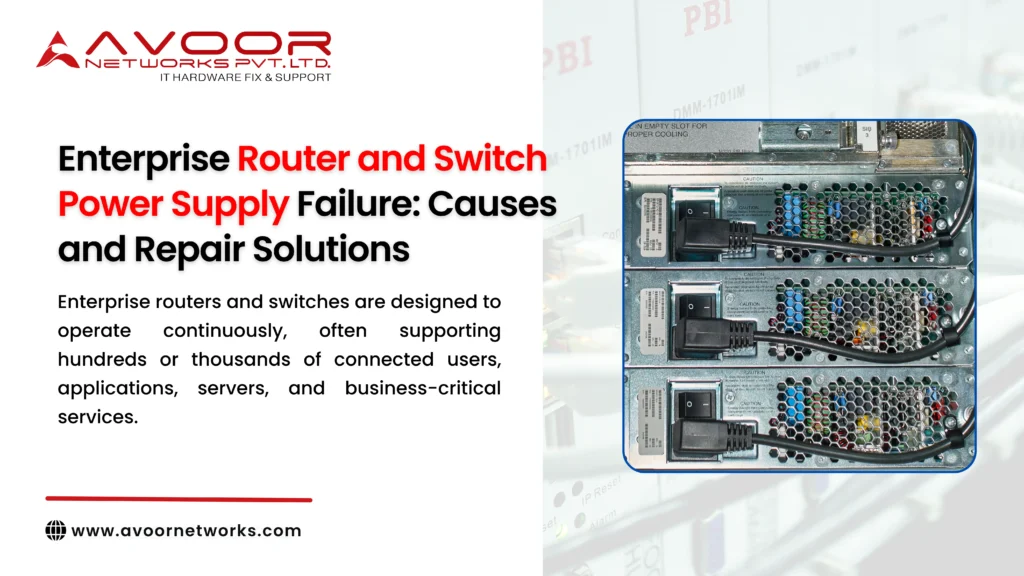
Enterprise routers and switches are designed to operate continuously, often supporting hundreds or thousands of connected users, applications, servers, and business-critical services. Although enterprise networking equipment is built for reliability, the power supply remains one of the components most vulnerable to electrical stress, heat, aging, and environmental conditions.
An enterprise router and switch power supply failure can cause sudden shutdowns, repeated restarts, boot failures, unstable network performance, or complete equipment failure. When a core router or switch goes offline, the resulting downtime can affect an entire office, data center, manufacturing facility, or enterprise network.
Understanding the causes of power supply failures and choosing the correct repair strategy can help organizations avoid unnecessary hardware replacement. At Avoor Networks Pvt Ltd, we provide chip-level network hardware repair, power supply repair, preventive maintenance, AMC and CAMC support, and PAN-India pickup and delivery for enterprise networking equipment, enterprise router and switch power supply failure.
This guide explains the most common causes, warning signs, diagnostic methods, and professional repair solutions for enterprise router and switch power supply problems, enterprise router and switch power supply failure, enterprise router and switch power supply failure.
What Is an Enterprise Network Power Supply?
A power supply unit, commonly called a PSU, converts incoming electrical power into regulated voltages required by the router or switch’s internal electronic circuits.
Depending on the equipment, an enterprise networking device may use:
- Internal AC power supplies
- Modular power supply units
- DC power supplies
- Hot-swappable PSUs
- Redundant power supplies
- Power over Ethernet power modules
These power systems must continuously provide stable voltage to processors, memory, network interfaces, cooling systems, PoE circuits, and other internal components.
Any instability can affect the entire device.
Common Symptoms of Enterprise Router and Switch Power Supply Failure
Early identification can prevent a minor PSU problem from causing more extensive PCB damage.
Typical symptoms include:
- Router or switch not powering on
- Device suddenly shutting down
- Frequent automatic restarts
- Intermittent power loss
- PSU warning LED
- Power supply fan not working
- Burning smell or visible component damage
- Abnormal operating temperature
- Device powering on but failing under load
- One PSU failing in a redundant configuration
These symptoms do not always confirm a failed PSU. Motherboard power circuits, input connectors, firmware issues, or other components can produce similar behavior, which is why proper diagnosis is essential.
7 Critical Causes of Enterprise Router and Switch Power Supply Failure
1. Voltage Fluctuations
Unstable input voltage can place significant stress on power supply components.
Repeated fluctuations can damage:
- MOSFETs
- Capacitors
- Rectifiers
- Voltage regulators
- Protection circuits
Using appropriate power conditioning and UPS infrastructure can reduce exposure to unstable power.
2. Electrical Surges
Sudden electrical surges can damage the PSU almost instantly.
Possible sources include:
- Utility disturbances
- Switching events
- Improper electrical infrastructure
- Lightning-related surges
A severe surge can damage both the PSU and downstream motherboard circuits.
3. Overheating
Heat is a major contributor to electronic component degradation.
Power supplies can overheat because of:
- Failed cooling fans
- Blocked air vents
- Dust accumulation
- Poor rack ventilation
- High ambient temperatures
- Continuous heavy loads
Long-term heat exposure can reduce capacitor life and increase stress on semiconductor components.
4. Aging Electronic Components
Enterprise network equipment often remains operational for many years.
Over time, components such as electrolytic capacitors, fans, switching devices, and solder joints may deteriorate.
Signs of aging can include:
- Difficult startup
- Intermittent shutdown
- Voltage instability
- Excessive PSU noise
- Increasing operating temperature
Preventive inspection becomes increasingly important as hardware ages.
5. Dust and Environmental Contamination
Dust restricts airflow and can increase internal temperature.
In severe environments, contamination may also affect:
- Cooling fans
- Connectors
- PCB surfaces
- Electronic components
Data centers and network rooms should maintain proper environmental controls and cleaning schedules.
6. Power Supply Overloading
A PSU operating continuously near or beyond its intended capacity may experience increased thermal and electrical stress.
This can be particularly important for PoE switches powering devices such as:
- IP phones
- Wireless access points
- IP cameras
- Other PoE endpoints
IT teams should monitor the available PoE power budget and overall hardware health.
7. Internal Component Failure
Sometimes the fault develops directly inside the PSU.
Potential failures include:
- Shorted MOSFETs
- Failed capacitors
- Damaged rectifiers
- Faulty PWM controllers
- Failed protection circuits
- Broken solder joints
Component-level diagnosis can determine whether repair is technically and economically practical.
Professional Diagnosis of Power Supply Failures
Replacing a PSU without confirming the root cause can result in repeated failures.
A structured diagnosis may include checking:
- Input power conditions
- PSU output voltages
- Short circuits
- Voltage rails
- Capacitor condition
- MOSFET functionality
- Cooling performance
- Motherboard power circuits
- Load behavior
Experienced engineers should also determine whether a failed PSU has damaged downstream components.
Enterprise Router and Switch Power Supply Repair Process
Step 1: Initial Inspection
The equipment is inspected for visible signs of:
- Burnt components
- Damaged connectors
- Failed fans
- PCB discoloration
- Capacitor damage
The reported symptoms are also reproduced where possible.
Step 2: Power Circuit Diagnosis
Engineers analyze relevant input and output sections to identify abnormal voltage, shorts, failed components, or unstable rails.
This step helps determine whether the fault originates in the PSU or another circuit inside the network device.
Step 3: Chip-Level Component Repair
When repair is viable, defective components may be replaced individually.
Common component-level work can involve:
- MOSFET replacement
- Capacitor replacement
- Diode or rectifier replacement
- Voltage regulator repair
- Controller IC replacement
- Connector restoration
- PCB trace repair
This can be considerably more economical than replacing an entire network device.
Step 4: Output and Stability Testing
After repair, technicians verify that power output remains stable under appropriate operating conditions.
Testing may include:
- Voltage verification
- Current behavior
- Thermal monitoring
- Startup testing
- Reboot testing
- Load testing
Step 5: Complete Device Testing
The router or switch should then be tested as a complete system.
Relevant tests can include:
- Boot validation
- Interface testing
- Network connectivity
- PoE testing where applicable
- Fan monitoring
- Extended operational testing
This helps ensure the repaired PSU works reliably with the equipment rather than only on a bench.
Repair vs Power Supply Replacement
| Factor | PSU Repair | PSU Replacement |
|---|---|---|
| Cost | Often lower | Can be higher |
| Component-Level Faults | Repairable in many cases | Complete unit replaced |
| EOL Equipment | Useful when spares are limited | Spare may be unavailable |
| Original Unit | Retained | Replaced |
| E-Waste | Lower | Higher |
| Best Option | Repairable PSU with identifiable fault | Severe damage or uneconomical repair |
The correct option depends on damage severity, equipment criticality, spare availability, PSU age, and overall repair economics.
How Preventive Maintenance Reduces PSU Failure Risk
Organizations should not wait until a router or switch stops powering on.
Preventive practices include:
- Inspecting power supplies regularly
- Cleaning cooling fans and air vents
- Monitoring equipment temperature
- Maintaining stable rack airflow
- Checking PSU alarms
- Monitoring redundant PSU status
- Inspecting UPS and PDU infrastructure
- Avoiding excessive PoE loading
- Replacing deteriorating fans proactively
- Maintaining service records
For mission-critical infrastructure, redundant power architecture should also be tested periodically.
Impact of Power Supply Failure on Enterprise Networks
A PSU fault can affect much more than one physical device.
Failure of a critical router or switch can cause:
- Network downtime
- Application disruption
- VoIP outages
- Loss of internet connectivity
- Server access problems
- Data center service interruption
- Employee productivity loss
- Customer service disruption
This makes power supply health an important part of enterprise network maintenance.
Why Choose Avoor Networks Pvt Ltd?
Avoor Networks Pvt Ltd provides enterprise network hardware repair and maintenance services across India with 26+ years of industry experience.
Our capabilities include:
- Router Power Supply Repair
- Switch Power Supply Repair
- Cisco Router Repair
- Cisco Switch Repair
- Firewall Repair
- Server and Storage Hardware Repair
- PCB-Level Chip Repair
- PoE Circuit Repair
- Power Circuit Diagnostics
- AMC and CAMC Services
- End-of-Life Hardware Support
- Refurbished Network Equipment
- PAN-India Pickup and Delivery
We support enterprise hardware from Cisco, Juniper, HPE, Dell, Fortinet, Aruba, Palo Alto Networks, Extreme Networks, Netgear, IBM, Avaya, NetApp, and other major networking brands.
Our repair approach focuses on accurate fault diagnosis, component-level restoration where practical, and comprehensive testing before equipment is returned to service.
Conclusion
An enterprise router and switch power supply failure can cause unexpected downtime, repeated restarts, network instability, and complete hardware shutdown. Voltage fluctuations, electrical surges, overheating, component aging, contamination, excessive loads, and internal PSU faults are among the most common causes.
Replacing an entire router or switch is not always necessary. Professional diagnostics can determine whether the power supply, motherboard power circuit, or individual electronic component is responsible. When technically appropriate, chip-level repair can restore the hardware while reducing replacement costs and electronic waste.
With preventive maintenance and enterprise router and switch power supply failure professional repair support from Avoor Networks Pvt Ltd, organizations can improve network hardware reliability, extend equipment lifespan, and minimize costly infrastructure downtime.